

Ask a rep how many tools they open before lunch. A typical answer includes a CRM, a dialer, an email tool, WhatsApp on their phone, a data provider, a meeting tool, a notes app and a chat app. Each one made sense when it was bought. Together they eat the day.
What the data says
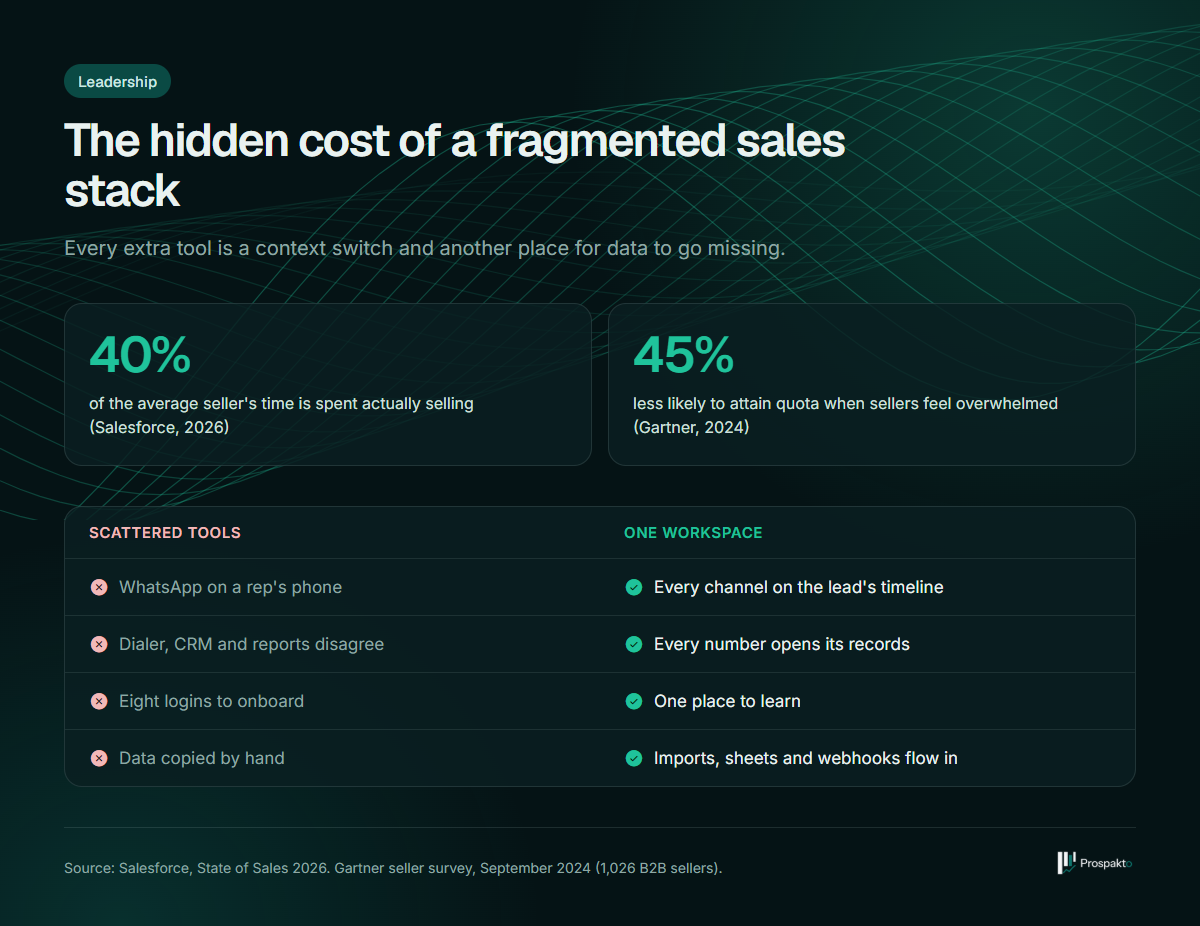
Salesforce's 2026 State of Sales survey of more than 4,000 sales professionals found the average seller spends 40% of their time actually selling (Salesforce). The rest goes to research, admin and moving information between systems.
Gartner's 2024 survey of 1,026 B2B sellers found that sellers who feel overwhelmed are 45% less likely to attain quota (Gartner). Tools are not the only cause of overload, but a stack that forces reps to switch screens and re-enter data adds to it.
The real costs of sprawl
Licence fees are the visible cost. The bigger ones are harder to see.
Context is lost between tools. The WhatsApp message a rep got on their phone never reaches the CRM, so the manager doesn't know it happened.
Numbers stop matching. The dialer says 400 calls, the CRM says 310, and the reporting tool says something else. Leaders stop trusting dashboards and go back to spreadsheets.
Onboarding slows down. A new rep has to learn eight logins before they can work a lead.
Security gets harder. Every tool holds customer data and needs its own access controls and offboarding.
How to audit your stack
List every tool and what it does
Include the unofficial ones, such as personal WhatsApp and shared spreadsheets. For each, note who uses it, what data it holds and what it costs.
Map tools to the journey of a lead
Lay them against the stages a lead moves through: arrives, researched, assigned, contacted, recorded, analysed, reported. Look for stages covered by three tools and stages covered by none.
Find where data is re-typed
Every place someone copies information from one tool to another is a candidate for consolidation.
Decide what must stay separate
Some tools should stay, for example a finance system or a specialist data provider. The goal is fewer handoffs. A single tool for everything isn't required.
Consolidating without losing data
| Step | What to do |
|---|---|
| Pick the system of record for leads | One place where every lead and every conversation lives |
| Import existing leads | Bring in CSV or Excel exports, and keep extra columns as custom fields |
| Connect live sources | Keep form and spreadsheet leads flowing automatically |
| Move channels one at a time | Start with the channel that causes the most missed context, often WhatsApp |
| Retire the old tool | Only after a full month with no data needed from it |
Prospakto is built to be that system of record for sales conversations. Its import wizard recognises exports from HubSpot, Salesforce and Pipedrive and keeps unmatched columns. Google Sheets and webhooks keep new leads flowing in, with duplicates skipped automatically.
What one workspace looks like
In Prospakto a rep works a lead from one page: WhatsApp, SMS, email, browser calls and video meetings, with every message and recording on the same timeline. Managers see dashboards where every number opens the records behind it. Admins connect the company's own accounts, such as Twilio and OpenAI, so usage is billed directly (integrations).
If you're weighing consolidation, read why buyers now expect one continuous conversation, or see why teams choose Prospakto.