

In the UAE, Saudi Arabia and Pakistan, and increasingly in the UK and Europe, WhatsApp is where business conversations happen. A buyer who ignores a cold email will often answer a short WhatsApp message the same hour.
Selling on WhatsApp at any scale means using the WhatsApp Business Platform rather than a personal phone. That brings two rules every sales team needs to understand.
Rule 1: the 24-hour customer service window
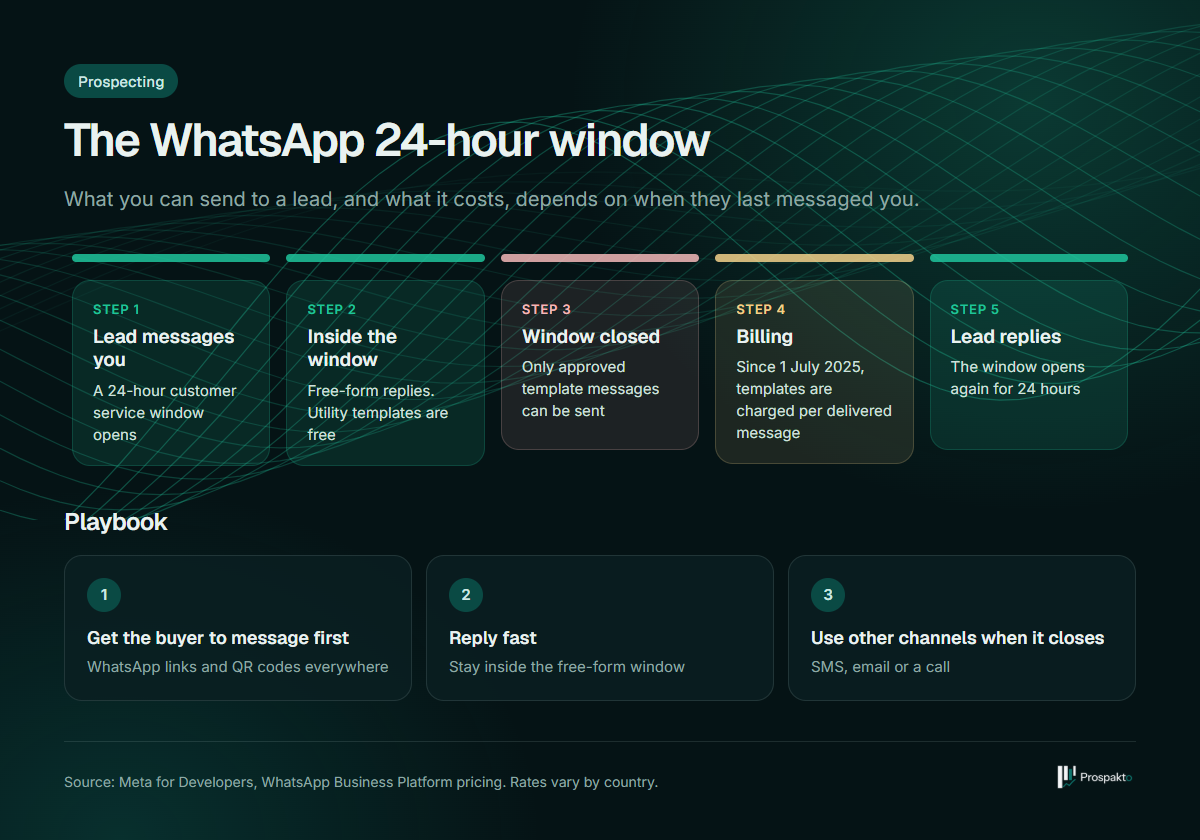
When a lead messages your business, a 24-hour customer service window opens. Inside it you can send free-form replies: any text, in any order, as a normal conversation. Each new message from the lead resets the window.
Once 24 hours pass without a message from the lead, you can only start the conversation again with an approved template message. Free-form replies are blocked.
In practice this means:
- Reply to WhatsApp leads fast. A slow reply can push you outside the window. The post on speed to lead covers why fast replies win anyway.
- Have approved templates ready for follow-ups, reminders and re-engagement.
- Switch to SMS, email or a call when the window has closed and a template isn't right.
Our product guide explains how this works inside Prospakto: The WhatsApp 24-hour window.
Rule 2: per-message pricing for templates
On July 1, 2025, Meta moved the WhatsApp Business Platform from charging per 24-hour conversation to charging per delivered template message (Meta for Developers). Templates fall into categories such as marketing, utility and authentication, and each category has its own rate, which varies by the recipient's country.
Two details matter for sales teams. Free-form replies inside the customer service window are not charged as templates. Utility templates sent inside an open window are also free. Marketing templates, the kind you would use to re-open a cold conversation, are the most expensive category.
The pricing rewards conversations the buyer starts and keeps going. A sales process built on fast, two-way replies costs less than one built on mass template blasts.
A WhatsApp playbook for B2B teams
Get the buyer to message first
Add a WhatsApp link or QR code to your website, ads, email signatures and event materials. A conversation the buyer starts opens the free-form window straight away.
Reply on WhatsApp, from a business number
Use a business number connected to your sales system, not a rep's personal phone. When the rep leaves, the conversations stay with the company.
Keep every channel on one timeline
A buyer might email a proposal question, then follow up on WhatsApp, then call. Your rep needs all three in one place. In Prospakto, incoming WhatsApp messages land on the lead's timeline automatically, and a message from an unknown number creates a new lead (how it works).
Respect channel preferences
If a lead asks not to be messaged on WhatsApp, record it and make sure both people and AI agents respect it. Prospakto stores this in each lead's Preferences.
Use an AI agent for out-of-hours replies
Many buyers in the Gulf message late in the evening. An AI agent can answer within the window, qualify, and hand over to a rep in the morning. See our AI SDR guide.
Market notes
Messaging habits differ by region. Our regional pages cover how teams sell in the UAE, Saudi Arabia, Pakistan, the UK and the US. In the UK and EU, data protection law also applies to how you source and contact prospects. Our guide to GDPR-compliant prospecting covers the basics.
Getting started in Prospakto
Prospakto connects to WhatsApp through your company's own Twilio account, so usage is billed to you directly. An admin adds a WhatsApp number under Settings > Phone numbers (steps), and from then on every WhatsApp conversation appears in the shared Conversations inbox alongside email, SMS and calls. See the Engage page for more.